Analytics
Redesign of Aligned Analytics to give sellers actionable, story-driven insight into buyer interactions – not just another dense reporting page.
Redesign of Aligned Analytics to give sellers actionable, story-driven insight into buyer interactions – not just another dense reporting page.

The original analytics view was both technically constrained and hard to navigate: events were stored in a way that made querying heavy, timelines were long and flat, and users weren’t sure where to start or how to drill down.
I needed to define a clear information story that answered:
What do sellers see first?
When do they scroll horizontally vs. vertically?
How do they move from a broad account overview into a specific room or interaction?
All of this had to sit on top of existing data structures and performance limits, so the design had to work with the tech, not fight it.
Defined a navigation model from account-level analytics → timeline → detailed activity, so sellers always know where they are in the story.
Improved clarity and scannability despite back-end constraints, making key insights much easier to access.
Increased engagement with analytics by turning room activity into something dynamic and explorable, rather than static reporting.
Prepared the platform for future analytics enhancements by establishing patterns for how new data types plug into the story.
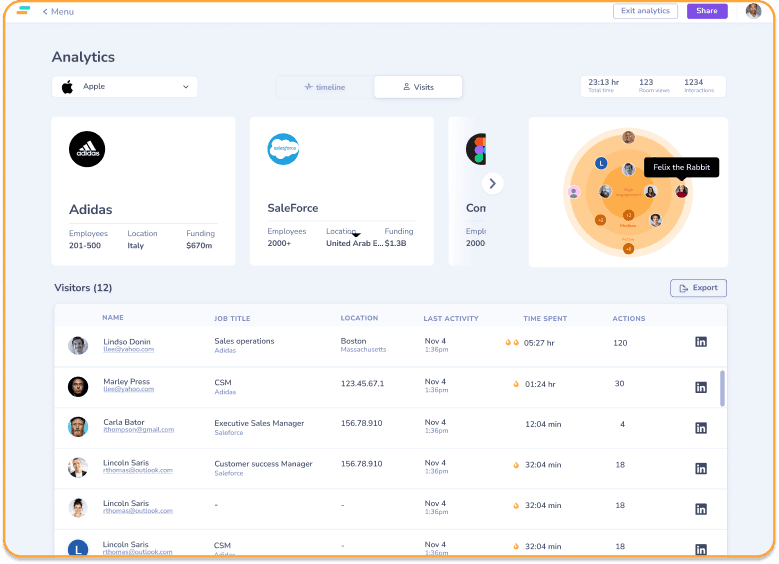
During user testing, one seller said that navigating the old timeline felt like “trying to find a needle in a haystack.” That line became the design brief. I introduced a split between macro and micro views: a higher-level “account and visit” view for scanning, and a focused activity log for deep dives. This shift in storytelling – from “all events at once” to “start broad, then zoom in” – made it much easier for users to follow the trail of engagement.
Redesign of Aligned Analytics to give sellers actionable, story-driven insight into buyer interactions – not just another dense reporting page.
The original analytics view was both technically constrained and hard to navigate: events were stored in a way that made querying heavy, timelines were long and flat, and users weren’t sure where to start or how to drill down.
I needed to define a clear information story that answered:
What do sellers see first?
When do they scroll horizontally vs. vertically?
How do they move from a broad account overview into a specific room or interaction?
All of this had to sit on top of existing data structures and performance limits, so the design had to work with the tech, not fight it.
Defined a navigation model from account-level analytics → timeline → detailed activity, so sellers always know where they are in the story.
Improved clarity and scannability despite back-end constraints, making key insights much easier to access.
Increased engagement with analytics by turning room activity into something dynamic and explorable, rather than static reporting.
Prepared the platform for future analytics enhancements by establishing patterns for how new data types plug into the story.
During user testing, one seller said that navigating the old timeline felt like “trying to find a needle in a haystack.” That line became the design brief. I introduced a split between macro and micro views: a higher-level “account and visit” view for scanning, and a focused activity log for deep dives. This shift in storytelling – from “all events at once” to “start broad, then zoom in” – made it much easier for users to follow the trail of engagement.
Redesign of Aligned Analytics to give sellers actionable, story-driven insight into buyer interactions – not just another dense reporting page.
The original analytics view was both technically constrained and hard to navigate: events were stored in a way that made querying heavy, timelines were long and flat, and users weren’t sure where to start or how to drill down.
I needed to define a clear information story that answered:
What do sellers see first?
When do they scroll horizontally vs. vertically?
How do they move from a broad account overview into a specific room or interaction?
All of this had to sit on top of existing data structures and performance limits, so the design had to work with the tech, not fight it.
Defined a navigation model from account-level analytics → timeline → detailed activity, so sellers always know where they are in the story.
Improved clarity and scannability despite back-end constraints, making key insights much easier to access.
Increased engagement with analytics by turning room activity into something dynamic and explorable, rather than static reporting.
Prepared the platform for future analytics enhancements by establishing patterns for how new data types plug into the story.
During user testing, one seller said that navigating the old timeline felt like “trying to find a needle in a haystack.” That line became the design brief. I introduced a split between macro and micro views: a higher-level “account and visit” view for scanning, and a focused activity log for deep dives. This shift in storytelling – from “all events at once” to “start broad, then zoom in” – made it much easier for users to follow the trail of engagement.